Back to projects
Active development

EvacuaPlan Studio

An interactive web editor for creating emergency and evacuation plans with specialized graphical tools.

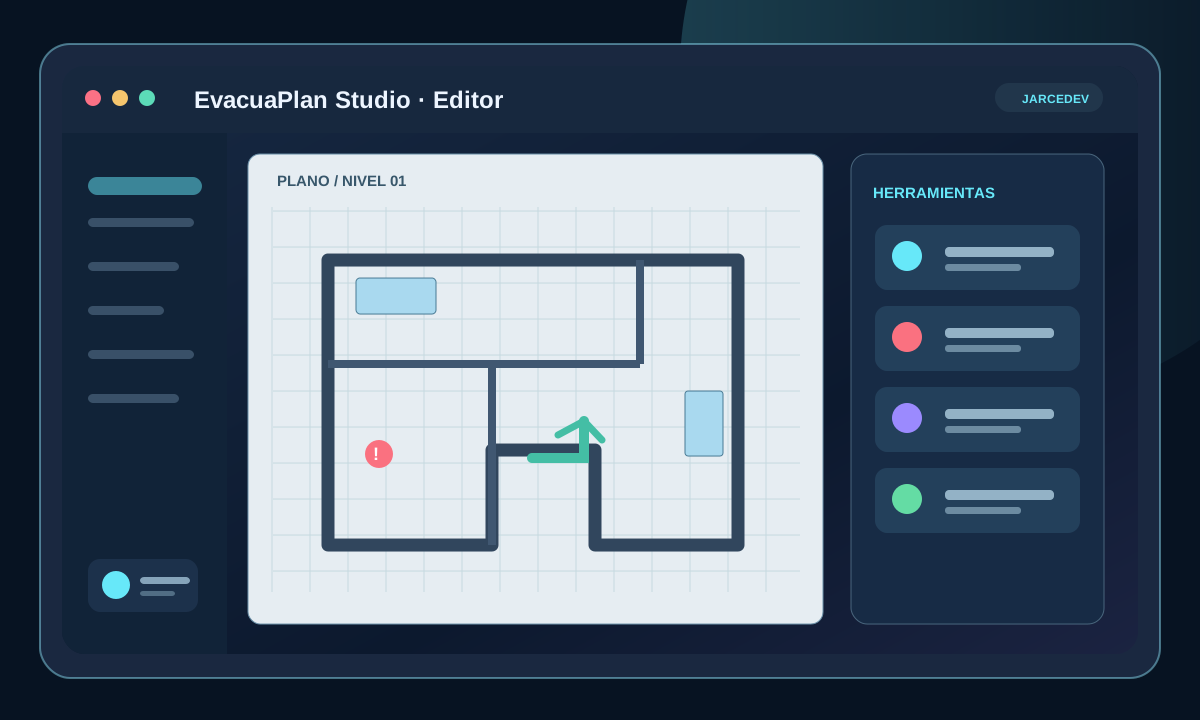
EvacuaPlan Studio brings to the web a process that normally requires general-purpose design tools or manual work. The goal is to provide a specialized, understandable editor prepared for printable documents.

EvacuaPlan editor with selectable emergency symbols

Role

Product design and Full Stack development

Timeline

2026–present

Platform

Desktop and tablet

Status

Functional technical prototype

The problem

Create a technical plan without turning the user into a graphic designer

Emergency plans combine architectural structure, symbols, routes, text and print requirements. General-purpose tools can be too complex for users who only need to produce a clear and useful document.

The challenge is to reduce that complexity without losing precision, editing capability or compatibility with different input devices.

The solution

A specialized editor built around the document workflow

I designed a fixed canvas per floor with dedicated tools for walls, doors, windows, areas, text, stairs and emergency symbols.

The interface combines direct canvas editing with a contextual properties panel, history controls, multi-selection and interactions adapted to mouse, touch and stylus input.

My role

Product, interaction and editor architecture

I define tool behavior, convert operational needs into interaction rules and develop the technical architecture that manages objects, geometry and change history.

01

Functional definition and editing experience

02

Object modeling and graphical state

03

Drawing and transformation tools

04

Mouse, touch and Apple Pencil interaction

05

Visual, functional and responsive testing

06

Git, checkpoints and incremental releases

Engineering decisions

A graphical editor requires control over state, geometry and interaction

The visible part is the canvas; the real difficulty is preserving coherent relationships between objects and allowing reversible changes.

01

Document-oriented canvas

Each floor uses a defined area to preserve scale, orientation and the relationship with the final printable output.

02

Structured object model

Walls, openings, areas, text and symbols maintain their own properties and behaviors.

03

Undo and redo

Changes are managed through history so users can experiment without losing the previous state.

04

Multi-selection

Several elements can be moved and managed together while respecting locked or protected objects.

05

Multi-modal interaction

Tools are validated with mouse, touch gestures, pinch zoom, two-finger pan and Apple Pencil.

06

Incremental evolution

Features are introduced in small stages to validate behavior before expanding complexity.

Current capabilities

A functional foundation for specialized technical editing

Architectural structure

Creation and editing of walls, doors, windows, areas and stairs.

Emergency symbols

A library of elements that can be moved, rotated, scaled and locked.

Advanced editing

Multi-select, copy, paste, lock, hide, delete, undo and redo.

Zoom and navigation

Zoom, fit-to-view, panning and behavior adapted to touch devices.

Floor management

A foundation prepared for separate levels and related views of a building.

PDF-oriented workflow

The editor structure is designed around clear final documents prepared for printing.

Visual walkthrough

Real product capabilities

EvacuaPlan editor with selectable emergency symbols

Symbol library and transformation

Emergency elements that can be moved, resized, rotated, locked and copied.

Project status

A functional technical prototype with complex interactions solved

The editor already supports structures, symbols, object transformation and multi-selection on desktop and tablet.

The project remains in active development and demonstrates work with complex state, geometry, graphical interfaces and touch interaction.

Verifiable signals

Active development

Mouse, touch and Apple Pencil

Multi-selection

Undo and redo

Multi-floor architecture

Next step

Does your project need a complex interface or specialized tool?

I can help translate interaction rules and technical processes into a maintainable web application.